Hostinger Review: Features, Pricing, Performance & Pros and Cons (2026)
Web Hosting Review
Hostinger Review: Features, Pricing, Performance & Pros and Cons (2026)
Last updated: October 30, 2026 | Editorial review
Choosing a web hosting provider is an important decision when starting a website. Hostinger is a popular option for beginners, bloggers, small businesses, and WordPress website owners. But is it the right hosting provider for your needs?
In this Hostinger review, we examine its hosting features, control panel, WordPress tools, security options, pricing considerations, advantages, and limitations. Our goal is to help you understand what Hostinger offers and what you should check before purchasing a plan.
Quick verdict:Hostinger is worth considering if you want an approachable hosting dashboard, beginner-friendly website tools, and a range of hosting plans. Your decision should depend on the resources, renewal costs, support requirements, and features included in the specific plan you choose.
Affiliate Disclosure: This article contains affiliate links. If you purchase through qualifying links on this page, GeekyBeginner may earn a commission at no additional cost to you. This does not affect our editorial discussion or the information presented in this review.
Hostinger is a web hosting company that provides services for individuals, developers, bloggers, and businesses. Its product range includes shared web hosting, WordPress hosting, cloud hosting, VPS hosting, domains, and website-building tools.
Web hosting allows your website's files, databases, and other resources to be stored on a server so visitors can access your website through the internet. Hostinger provides hosting plans with different resource limits and features to support different website requirements.
Beginners may find its managed dashboard and guided setup tools useful, while more experienced users may be interested in its server options and available development features.
2. How to Evaluate Hostinger
A hosting review should look beyond the introductory price. A low starting price does not automatically mean that a plan is the best value for every website.
Before choosing a hosting provider, consider these factors:
Ease of use: Is the dashboard understandable for a new website owner?
Resources: Does the plan provide enough storage, websites, and processing resources?
Performance: Does the hosting infrastructure suit your website's expected traffic?
Security: What security tools and SSL options are included?
Backups: How frequently are backups created, and how can they be restored?
Support: Are the available support channels suitable for your needs?
Renewal pricing: What will the plan cost after its initial subscription period?
This article is a feature- and documentation-based editorial review. It does not claim independent server speed tests, uptime measurements, or hands-on benchmark results.
3. Hostinger Features
Hostinger offers different features depending on the hosting product and subscription plan. Always check the current plan details before purchasing because resource limits and included services can vary.
Website Hosting
Hostinger provides hosting space for website files and related resources. The number of websites and the available storage depend on the selected plan.
SSL Availability
SSL helps encrypt the connection between a visitor's browser and a website. Check the selected plan to confirm SSL availability and whether it is included for all the websites you intend to host.
Website Migration Tools
Website migration options can help users move an existing website to a new hosting provider. The available migration process and eligibility requirements should be checked with Hostinger before starting.
Website Creation Tools
Hostinger offers website-building options for users who want to create a website without developing every component manually. Available tools and features depend on the product.
Multiple Hosting Products
Users can choose between different hosting types depending on their website requirements. Shared hosting may suit smaller projects, while cloud or VPS hosting may be more appropriate for different resource and configuration needs.
4. Hostinger hPanel Review
hPanel is Hostinger's hosting management dashboard. It provides a central place to manage hosting-related settings and website tools.
Depending on your hosting plan, hPanel can provide access to tasks such as:
Managing websites and hosting settings.
Managing domains and DNS-related settings.
Accessing databases and file management tools.
Managing email-related services where included.
Working with backups and security options.
Accessing WordPress management features.
For beginners, having these tools in one dashboard can make routine hosting tasks easier to find. However, users who are accustomed to cPanel may need some time to become familiar with hPanel's layout.
5. Hostinger WordPress Hosting
WordPress is a widely used content management system for blogs, business websites, portfolios, and online stores. Hostinger provides WordPress hosting options designed to help users set up and manage WordPress websites.
Depending on the plan, WordPress-related tools may include:
WordPress installation and setup options.
WordPress management through hPanel.
SSL and security-related features.
Backup options.
Tools for managing website performance.
Support for WordPress themes and plugins.
Keep in mind that hosting does not automatically make a WordPress website fast or secure. Your theme, plugins, images, caching configuration, and website maintenance also affect its performance and security.
6. Hostinger Performance Considerations
Website performance depends on several factors, including server resources, server location, caching, website code, database queries, images, and visitor traffic.
Hostinger's hosting plans have different resource allocations. A small blog and a high-traffic online store may not have the same hosting requirements, so it is important to choose a plan based on your actual workload.
What Can Affect Website Speed?
Large images and unoptimized media files.
Too many plugins or poorly coded themes.
Uncached pages and database requests.
Insufficient hosting resources for the traffic level.
Server location relative to your visitors.
External scripts and third-party services.
If performance is important, test your own website using tools such as Google PageSpeed Insights and monitor its results over time. Do not assume that a hosting provider guarantees a particular loading speed for every website.
7. Hostinger Security and Backups
Website security is a shared responsibility between the hosting provider and the website owner. Hosting-level security features can help, but they do not replace good website maintenance.
Before choosing a plan, review the following:
SSL: Confirm whether SSL certificates are included for your websites.
Backups: Check backup frequency, retention period, and restoration options.
Account security: Use a strong password and enable additional account protection where available.
WordPress updates: Keep WordPress core, themes, and plugins updated.
Access control: Use secure credentials and remove accounts that no longer need access.
Important: Never rely on a single backup copy. Keep an additional backup of important website files and databases in a separate location.
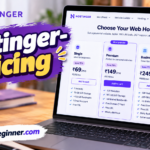
8. Hostinger Pricing
Hostinger offers different subscription plans and billing periods. The price shown in an advertisement or promotional offer may depend on the selected plan, subscription duration, region, taxes, and current promotion.
Introductory prices and renewal prices can be different. A longer initial subscription may reduce the advertised monthly equivalent while requiring a larger upfront payment.
What to Compare
What to Check
Introductory price
The promotional price for the first subscription period.
Renewal price
The amount payable when the initial term ends.
Billing period
Whether the displayed monthly rate requires a longer upfront subscription.
Website limits
How many websites the selected plan supports.
Storage and resources
The storage and other resource limits included in the plan.
Included features
Backups, SSL, email, migration, and other plan-specific features.
For the latest rates and plan conditions, check the official Hostinger pricing page before purchasing. Prices and offers can change, so verify the checkout total and renewal terms.
The following points summarize potential advantages and limitations to consider. The actual experience depends on your selected plan, website requirements, and expectations.
Potential Advantages
Potential Limitations
Beginner-oriented hosting dashboard.
Existing cPanel users may need to learn hPanel.
Different hosting products and plan levels.
Features and resource limits vary by plan.
WordPress hosting and management options.
Website performance still depends on configuration and workload.
Website tools available from a central account.
Some users may require more advanced server control.
Promotional subscription offers may be available.
Renewal pricing can differ from introductory pricing.
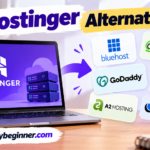
10. Hostinger Alternatives
Hostinger is not the only option available. You should compare hosting providers based on the type of website you operate, your budget, technical requirements, support expectations, and renewal costs.
Bluehost
Bluehost is another hosting provider that website owners may compare when looking for WordPress hosting and beginner-oriented website setup options.
SiteGround
SiteGround is an alternative worth researching if you want to compare managed hosting features, support options, and plan pricing.
GoDaddy
GoDaddy provides hosting and domain-related services. Compare its hosting resources, renewal costs, and included features with the Hostinger plan you are considering.
11. Final Verdict: Is Hostinger Worth Considering?
Hostinger can be a suitable option for beginners, bloggers, and website owners who want a hosting dashboard with website management tools and different hosting plans.
However, the right choice depends on more than the advertised monthly price. Review the plan's website limits, storage, backups, security features, renewal price, and support options before purchasing.
If you are creating your first website, a beginner-friendly plan may be sufficient. If you operate a growing business or a resource-intensive website, compare the higher-tier options and alternatives carefully.
Hostinger offers a hosting dashboard and website setup tools aimed at making common hosting tasks accessible. Beginners should still review the features and limits of their selected plan.
Is Hostinger suitable for WordPress?
Hostinger provides WordPress hosting options and management features. Check the selected plan's resources and included WordPress tools before choosing it.
Does Hostinger offer SSL?
SSL availability depends on the hosting product and plan conditions. Confirm the current SSL details on the official plan page.
Are Hostinger introductory and renewal prices the same?
Not necessarily. Promotional introductory prices can differ from renewal rates. Check the full subscription and renewal terms before checkout.
Can I host multiple websites with Hostinger?
The number of websites you can host depends on your selected plan. Check the current plan comparison for the exact website limit.
Can I move my existing website to Hostinger?
Website migration options may be available, depending on your website and the current migration requirements. Review Hostinger's migration instructions before starting.